- SkypeOut: Using SkypeOut, Skype users can call fixed and mobile phones at very low rates—in some cases, as low as 2¢ per minute.
- SkypeIn: SkypeIn provides a dial-in number that enables regular and mobile phone users to call Skype users. A SkypeIn number—and you can have as many as you want—costs $35 per year, or $12 for 3 months.
- Voicemail: Skype Voicemail ($6 for 3 months or $18 for a year) is for those times for when you are away from your PC or busy on another call and don’t want to miss any incoming calls. As an added bonus, as a Skype Voicemail subscriber, you can send voicemail messages to other Skype users, even if they aren’t voicemail subscribers themselves!
- Skype Zones: If you want to use Skype while on the move, this might be for you. Skype Zones gives you access to more than 18,000 wireless Internet access points around the world from which you can make and receive Skype calls. In fact, you can use all the usual features of Skype, including any Skype services (SkypeOut, SkypeIn and Skype Voicemail) to which you have subscribed.
- Skype Control Panel: Skype Control Panel is targeted at business users of Skype who want to have a central administrator for several accounts, to simplify payment and management of Skype services. This service might also appeal to individuals who maintain several Skype accounts. The Skype Control Panel and other business-oriented features of Skype are not covered in this book, but additional details can be found online at www.skype.biz.
- Personalise Skype: Using this service you can buy personalized pictures to add some pizzazz to how others see you online and buy custom ringtones that make Skype more pleasant and fun to use.
Showing posts with label 1. Introduction on Skype. Show all posts
Sunday, August 30, 2009
Skype’s fee-based features
Free Features of Skype
Skype’s free, basic features are as follows:
- Skype-to-Skype calls: Skype-to-Skype calls are free and always will be for noncommercial calls—regardless of location or duration!
- Video calls: Skype allows you to see the other person during a voice call if both people have Skype-compatible video cameras and both have enabled this feature in Skype. With Skype video, you can talk face-to-face with someone else regardless of distance, and it won’t cost you a penny!
- Toll-free calling: Skype users can make free calls to most tollfree numbers, whereas some other Internet telephony providers charge for such calls. As an added bonus, you can even call tollfree numbers in other countries, which is something that regular phones often can’t do!
- Conference calls: You and up to four other people can conference-call together at the same time. Moreover, during a conference call, participants can also chat together and transfer files to one another (or to all participants) by simply draggingand- dropping files.
- Call forwarding: Away from your PC, but don’t want to miss any important calls? No problem, just use Skype’s callforwarding feature. Using call forwarding, Skype-to-Skype calls and SkypeIn calls from regular phones can be forwarded to as many as three Skype accounts or regular phone numbers (of course, you can only forward calls to regular phones if you are a SkypeOut subscriber, in which case the call rate appropriate to the call’s destination will apply).
- Chat: Using Skype’s chat feature you can exchange text messages with another Skype user in real time.
- Multi-chat:Why limit yourself to one-on-one chat? With Skype’ multi-chat feature you and a bunch of friends, family members, or work colleagues (up to 50 in total) can chat online in real time so that all text messages are seen by all chat participants.
- Chat emotional icons: Otherwise known as “emoticons,” these small icons can be inserted into text messages during chat sessions so that chat participants can quickly and easily express their emotional state or emotional response to chat activity in real time.
- File transfer: You can transfer a file to one or more Skype users from within your contacts list at any time or with anyone during an active Skype-to-Skype call or chat session. And you can do all this with little more than a rightclick of your mouse, or by dragging-and-dropping a file.
- Contact management: Add your own contacts, search Skype contacts, import existing contacts held outside Skype, share your contacts with other Skype users, and group contacts into meaningful categories for convenience and to carry out group-specific tasks, such as conference calls, with a click of the mouse.
- End-to-end encryption: Skype uses encryption to scramble data so that it is unintelligible to any eavesdropper while it is being transmitted over the Internet. This means that Skype-to-Skype calls are more secure than regular or mobile phone calls! However, calls that use the public telephone network through SkypeOut and SkypeIn are not encrypted—and so are less secure than Skype-to-Skype calls—once outside the Skype network.
- Privacy controls: Control who can call you, who cannot call you, or who can chat with you.
- Visibility controls: Using Skype’s online status settings you can control how visible, or invisible, you are on the Skype network.
- Mood messages: As part of how you are seen by others on the Skype network, you can choose to post a mood message that will be seen when another Skype user clicks on your entry in their contacts list. Mood messages can display any sort of short text message.
- Skype toolbars: Skype provides productivity-enhancing toolbars for Microsoft Outlook and Internet Explorer that more closely integrate those applications with Skype.
- Skype buttons: Using Skype buttons, you can add a clickable button to a web page, your e-mail signature, or your blog that allows others to easily interact with you though Skype.
- Multi-platform support: Skype runs on Windows, Mac OS X, Linux, and Pocket PC. This book focuses on Skype for PCs running Microsoft Windows.
- Multi-language support: The Skype softphone is available in 27 languages.
- No spyware, adware, or malware: More of a promise than a feature, this is a commitment by Skype to keep their software free from all other software that might spy on you, pester you with advertising, or otherwise maliciously interfere with your PC.
Sunday, June 28, 2009
A brief history on Skype
Skype was founded in 2002, but the domain names Skype.com and Skype.net weren’t registered until April 2003. August 2003 saw the release of the first public beta, or trial, version of the Skype softphone (often also referred to as the Skype client). In June 2004, Skype introduced its first fee-based service, SkypeOut, which enables Skype users to call regular phone numbers all over the world at very low rates (as low as $0.021 per minute). SkypeIn, which is a fee-based service that allows people to call Skype users from regular phones, debuted in March 2005. Skype continues to add new features and services at a rapid pace.
What SKype can Do?
Skype’s fee-based subscription services enhance Skype so that you can also make calls to, as well as receive calls from, regular and mobile phones. For additional fees, you can add on voicemail, custom ringtones, and other optional services.
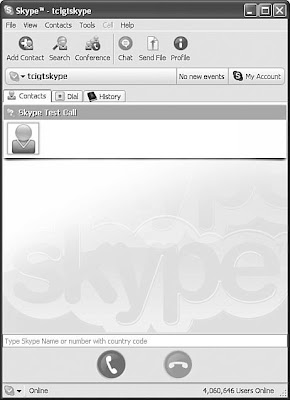
Skype’s phenomenal success, in large part, is due to the rich—and growing—feature set you get simply by installing Skype on your computer. Also, Skype has received a good deal of praise for the simplicity of its user interface and its ease of use, which have done much to contribute to its success. The Skype softphone runs in a small window on your PC, with a graphical interface that is surprisingly easy to navigate given the number of features it supports, as the following figure illustrates. As mentioned previously, you can augment Skype’s basic feature set by subscribing to any of the following fee-based services:
- SkypeOut: Make calls to regular and mobile phones.
- SkypeIn: Receive calls from regular and mobile phones.
- Voicemail: Record voice messages from callers.
- Skype Zones: Use all of Skype’s services while traveling.
- Personalise Skype: Add custom ringtones and pictures to the
- Skype softphone.
- Skype Control Panel: Manage Skype subscription services for a group of Skype users (mostly of interest to business users of Skype).
In contrast to many regular and mobile phone plans, which are typically quite inflexible about what features are included with your service plan, with Skype you only have to pay for those features you want. Plus, Skype doesn’t require you to sign any complex or longterm contracts. That’s right: you can cancel anytime—often receiving a refund for unused services. Try that with your phone company or mobile carrier!
Monday, January 28, 2008
Making Skype Play Well with Others
Unlike telephones, Skype is a social butterfly capable of connecting a handful of people for a conference call, up to a hundred people for a chat, or a hundred people for a Skypecast. But as with all social butterflies, you have to set down some rules. These rules and guidelines are spelled out in the various chapters on Skype conferencing, chats, and Skypecasting
When enterprise security matters
Skype can pass text, data, voice, and video through firewalls and routers without requiring special setup. For this reason, Skype can bypass normal IT security controls. However, Skype can be deployed and configured to prohibit file transfers over Skype and using the Skype API.
When the Web is your playground
Skype mingles easily with social, business, and e-commerce networks, such as Bebo and eBay. Skype social communities of all stripes —for dating and friendship, education, special interests — are connecting people from all over the world.
When you sign on to these Web-based communities, your Skype Name is posted along with your email and any other contact information you provide. On these online communities, a little icon next to your Skype Name changes when you are online, offline, or just don’t want to be interrupted. But the best part is that although everyone has your Skype Name, you can require people to ask permission to speak with you. A little different from annoying sales calls at dinner, isn’t it?
When enterprise security matters
Skype can pass text, data, voice, and video through firewalls and routers without requiring special setup. For this reason, Skype can bypass normal IT security controls. However, Skype can be deployed and configured to prohibit file transfers over Skype and using the Skype API.
When the Web is your playground
Skype mingles easily with social, business, and e-commerce networks, such as Bebo and eBay. Skype social communities of all stripes —for dating and friendship, education, special interests — are connecting people from all over the world.
When you sign on to these Web-based communities, your Skype Name is posted along with your email and any other contact information you provide. On these online communities, a little icon next to your Skype Name changes when you are online, offline, or just don’t want to be interrupted. But the best part is that although everyone has your Skype Name, you can require people to ask permission to speak with you. A little different from annoying sales calls at dinner, isn’t it?
Skype terms
These terms may not have made it into the Oxford English Dictionary yet, but who knows, maybe you can say you saw them here first!
- To Skype (verb, infinitive form): To communicate over the Internet using voice, video, text, and file transfers using a special program called Skype.
- Skyping (present participle): The act of calling over Skype.
- Skyper (noun): A person who skypes.
- Skype (proper noun): The software and the company that makes it.
- Skype Name: Your personal Skype ID.
- SkypeIn: A service provided by Skype through which a person using a regular phone can call and connect to a skyper.
- SkypeOut: A service that allows a skyper to call a regular telephone using the Skype software.
- Skype Me: A mode of alerting the world that you are available for contact and making new friends.
Getting a Load of Add-Ons and Accessories
Having more features and capabilities to enhance Skype can be highly desirable, and Skype makes it easy to integrate third-party applications and plugins to work with its software. Skype permits and in fact encourages third-party companies to bring enhancements to Skype. (Such enhancements are handled through something called Skype Application Programming Interface [Skype API], but that’s more than you need to know.)
Going wireless
Skype delivers a new kind of freedom — the ability to make and receive calls wirelessly and without even needing a computer. A new type of phone, called a Wi-Fi phone, has Skype already built in and can tap into wireless or Wi-Fi networks. When you’re connected to a network, whether from your office, home, or public Internet hot spot, you can use Skype. With these devices, you sign on to Skype as you would from your computer and you’re good to go.
Software and gadgets, too
When you connect through Skype, you need some way to speak and hear your conversations on Skype. Most computers have an audio jack for a microphone and a speaker out line. If you don’t already have a microphone and headset, you can purchase them inexpensively. Bluetooth (wireless) headsets, USB headsets, USB speakerphones, mini-plug headsets, and built-in microphones are available in all colors and sizes, some with noise cancellation, volume control, and mute buttons. You have many choices. The capabilities of Skype are not limited to traditional “telephone” calls.
Skype supports videoconferencing, for which you’ll need a good webcam. You can record interviews and save them as media files with Skype, so you’ll need recording and playback software. If you like to skype but don’t like to be stuck at a desk, you can skype from digital handsets known as Skype Phones that work within 50 feet of your computer. You can even store your whole Skype operation on a USB drive, travel the world, and simply plug and play wherever you land.
Going wireless
Skype delivers a new kind of freedom — the ability to make and receive calls wirelessly and without even needing a computer. A new type of phone, called a Wi-Fi phone, has Skype already built in and can tap into wireless or Wi-Fi networks. When you’re connected to a network, whether from your office, home, or public Internet hot spot, you can use Skype. With these devices, you sign on to Skype as you would from your computer and you’re good to go.
Software and gadgets, too
When you connect through Skype, you need some way to speak and hear your conversations on Skype. Most computers have an audio jack for a microphone and a speaker out line. If you don’t already have a microphone and headset, you can purchase them inexpensively. Bluetooth (wireless) headsets, USB headsets, USB speakerphones, mini-plug headsets, and built-in microphones are available in all colors and sizes, some with noise cancellation, volume control, and mute buttons. You have many choices. The capabilities of Skype are not limited to traditional “telephone” calls.
Skype supports videoconferencing, for which you’ll need a good webcam. You can record interviews and save them as media files with Skype, so you’ll need recording and playback software. If you like to skype but don’t like to be stuck at a desk, you can skype from digital handsets known as Skype Phones that work within 50 feet of your computer. You can even store your whole Skype operation on a USB drive, travel the world, and simply plug and play wherever you land.
Going Beyond the Basics with (Not Necessarily Free) Services
Skype does many things right out of the virtual box. But you can add a full complement of features and services provided by Skype and third-party companies.
Skyping in from a phone
How can people call you from a regular telephone if Skype runs on a computer? Well, for a small fee you can get a SkypeIn phone number that anyone with a regular phone can call. There are no surcharges of any kind. The person calling you calls your SkypeIn number. As far as he or she is concerned, the call is being made to a regular phone number. The charges incurred by the call amount to whatever they would be to make a call to a phone in your area code. When you sign in to Skype, SkypeIn calls are automatically routed to you. You can be anywhere on the planet. If you are connected to Skype, the calls get to you just the same.
Skyping out to a phone
Not only can people call into Skype using an ordinary telephone, but you can call out to anyone on a landline or mobile phone using SkypeOut. Making a call from a computer to a telephone is as easy as entering the phone number and pressing Enter. The charge for the call appears on your screen (if there is a charge; some calls are free). How do you pay for this? Buy a block of minutes with SkypeOut credits. When your SkypeOut minutes are used up, you can purchase more.
Getting voicemail
What’s phone service without voicemail? You can add voicemail to Skype with Skype Voicemail (a plain-vanilla service), or with Pamela or Skylook (both are packed with features). Skype Voicemail is bundled with SkypeIn. If you want Skype Voicemail without SkypeIn, you can purchase it with Skype credit. Pamela and Skylook have “lite” versions for free, but the good stuff costs a few dollars (really, just a few).
Skyping in from a phone
How can people call you from a regular telephone if Skype runs on a computer? Well, for a small fee you can get a SkypeIn phone number that anyone with a regular phone can call. There are no surcharges of any kind. The person calling you calls your SkypeIn number. As far as he or she is concerned, the call is being made to a regular phone number. The charges incurred by the call amount to whatever they would be to make a call to a phone in your area code. When you sign in to Skype, SkypeIn calls are automatically routed to you. You can be anywhere on the planet. If you are connected to Skype, the calls get to you just the same.
Skyping out to a phone
Not only can people call into Skype using an ordinary telephone, but you can call out to anyone on a landline or mobile phone using SkypeOut. Making a call from a computer to a telephone is as easy as entering the phone number and pressing Enter. The charge for the call appears on your screen (if there is a charge; some calls are free). How do you pay for this? Buy a block of minutes with SkypeOut credits. When your SkypeOut minutes are used up, you can purchase more.
Getting voicemail
What’s phone service without voicemail? You can add voicemail to Skype with Skype Voicemail (a plain-vanilla service), or with Pamela or Skylook (both are packed with features). Skype Voicemail is bundled with SkypeIn. If you want Skype Voicemail without SkypeIn, you can purchase it with Skype credit. Pamela and Skylook have “lite” versions for free, but the good stuff costs a few dollars (really, just a few).
Skype is great for professional services, too
Chats are fun, but Skype can be good for your career, too. Think about how Skype can serve you. Say, for example, that you’re sitting in an airport waiting for your flight. The Director of Sales has just attended a briefing with a major customer and found out that the customer needs double the amount of merchandise that was negotiated six months ago. Now the two of you need to validate that you can fulfill the revised production schedule, and doing so involves the Product Development Manager. Why not set up an impromptu conference call that includes all three of you? You’re in an airport in Chicago, which has a public Wi-Fi network. The Sales Director is in the Dallas office, and the Product Development Manager is at home in San Diego. But that’s okay — it doesn’t matter where you are.
One of the marvels of this technology is that any of you can instantly convene a conference call, and you can all be in different cities around the globe. It is great to have the convenience of a conference call. This one sounds as though it’s pretty serious. Think you might need to exchange documents, such as spreadsheets or PowerPoint slides? Well, you can do just that..
Hold on — what about the fact that you’re sitting in an airport? An airport can be a favorite spot for industrial espionage. Skype, however, creates a roadblock for your corporate competitor: All the file transfers, all the chats, and all the conversations that take place are secure and encrypted!
One of the marvels of this technology is that any of you can instantly convene a conference call, and you can all be in different cities around the globe. It is great to have the convenience of a conference call. This one sounds as though it’s pretty serious. Think you might need to exchange documents, such as spreadsheets or PowerPoint slides? Well, you can do just that..
Hold on — what about the fact that you’re sitting in an airport? An airport can be a favorite spot for industrial espionage. Skype, however, creates a roadblock for your corporate competitor: All the file transfers, all the chats, and all the conversations that take place are secure and encrypted!
It’s great for personal communications
The Skype community is international. People from all corners of the globe show up in the searches, so it helps to provide identifying information in your Skype profile, such as your language, country, and perhaps city. Click the Profile icon to get public information about any Skype user selected in your search results / More important, you can add a person to your Contacts list. Adding someone to your Contacts list entails seeking that person’s permission and receiving his or her contact information. You’ll quickly find that people enjoy working with Skype and are usually eager to exchange information on how to best use Skype. After you start making the rounds, you’ll want to try the chat or instant messaging capabilities
You can use equipment and services you already have
Why would you want to use the Internet to manage phone conversations? First, you already have it (and pay for it). Internet use is widespread; it seems that nearly everyone has it. The technology keeps improving every day. If you already have access to the Internet, you can handle much of your long distance calling over the Internet for very low cost or for free, and often with better sound quality than you get from cell phones and regular phones. Also, you may be able to do things with an Internet-based phone system that you can’t do with a conventional phone system. You can run a Skypecast with a hundred people. You can send and receive files that would choke your email system. You can send and receive live video from anywhere in the world. Better yet, all these transmissions over Skype occur on secure and encrypted lines of communication.
Skype is Free
Skype (the basic stuff) is free
To use Skype, you need only three things:
If you want more than just the basic service, however, you will have to pay. Skype is free when you talk to another Skype user on a PC. But what if you want to call, say, your grandmother, who doesn’t have a computer? For a small fee (as low as two cents a minute or even free), you can “SkypeOut” from your computer to a conventional phone. The cost depends on whether she’s in the same country as you are and how long you speak. Similarly, someone who doesn’t have Skype can call you using the “SkypeIn” feature.
To use Skype, you need only three things:
- A computer with access to the Internet: Your Internet connectionshould be faster than dial-up. Just as Web access with dial-up does not work very well, the same is true of Skype with a dial-up connection. You’re best off using a high-speed broadband connection DSL or cable
- A free software program called Skype: You can get this program from www.skype.com .
- A microphone and headset: Plenty of audio device options are available , ranging from inexpensive ($20 or so) to a little more pricey.
If you want more than just the basic service, however, you will have to pay. Skype is free when you talk to another Skype user on a PC. But what if you want to call, say, your grandmother, who doesn’t have a computer? For a small fee (as low as two cents a minute or even free), you can “SkypeOut” from your computer to a conventional phone. The cost depends on whether she’s in the same country as you are and how long you speak. Similarly, someone who doesn’t have Skype can call you using the “SkypeIn” feature.
Seeing What Skype Can Do For You
Skype can dramatically alter how you exchange information, how you meet new people, and how you interact with friends, family, and colleagues. Although you can make calls on Skype, there is oh so much more to it. For starters, here are some things you get or can do with Skype:
- Call to or receive a call from a regular telephone, a cell phone, or a computer on the Internet.
- Send or receive files over the Internet to and from fellow skypers.
- Search your Outlook contacts and call them within Skype.
- Search the Skype database of all Skype users on the planet. Hold a conference call with a group of people. Besides participating in audio conferencing, you can “simul-chat” with your conference participants — exchanging text, live Web links, and files. Make live video calls.
- Initiate a group chat.
- Hold a Skypecast for as many as 100 people at a time. Transmit secure and encrypted voice conversations, text, file transfers, and video.
Introduction
Do you know what happens when you speak to someone over a phone line? Your conversation is converted into an electronic signal and sent over a copper wire or some wireless network to someone else’s phone. The phone companies have set up vast networks to seamlessly connect you to just about anyone on the planet and these days, the networks are all digital even if your phone is not. In addition to managing the call, phone companies track where you are dialing to and how long the call persists so that they can send you a bill at the end of the month.
Wait a second — if the zeros and ones pushed through the phone lines are the same as the zeros and ones found on computers like yours, networks, and the World Wide Web, why can’t you push those zeros and ones through the Internet? Well, you can. That’s what Skype is all about. In this chapter, you find out what makes Skype different from regular telephones, along with surprising ways to use Skype and a quick overview of ways to make Skype fun and productive.
Subscribe to:
Posts (Atom)